Read each pipeline left to right: those are the actual n8n nodes. “What runs automatically” is the build; “What the business gets” is why a client pays for it.
n8n Project 1n8n WorkflowLead Data
AI Lead Enrichment & Smart Routing Engine
For: agencies · real estate · B2B services · anyone buying ads or traffic
Raw form fills are messy — typos, fake numbers, no context. This workflow cleans every lead, enriches it with company and location data, scores it with AI, then routes hot leads to a human in seconds and warm leads into nurture.
Webhook · TriggerForm, ad platform or landing page posts the lead
→Code · Clean & validateFixes phone / email format, removes duplicates & spam
→HTTP · EnrichAdds company, role, area & website data
→AI Agent · ScoreScores fit & intent 1–100 with a written reason
→IF · RouteHot → Slack alert + CRM task · Warm → email nurture · Cold → archive
n8n · Executions — Lead Enrichment, latest runSample screen
| Lead | Enriched with | AI score | Route |
|---|
| Maya Chen · maya@brightpathdental.com | Bright Path Dental · Owner · Austin TX | 92 / 100 | Slack alert + CRM task — “multi-location, hiring, asked for pricing” |
| Tom Alvarez · tom@alvarezlogistics.com | Alvarez Logistics · Ops Manager · Denver CO | 74 / 100 | Email nurture sequence, day 1 sent |
| info@tempmail.io | No company match · disposable email | 12 / 100 | Archived as spam |
What runs automatically
- Validation, de-duplication and enrichment on every lead
- AI scoring with the reasoning stored next to the lead
- Instant owner alerts for hot leads, with full context
What the business gets
- Sales time spent on real buyers, not junk enquiries
- Every lead answered or filed — none lost in an inbox
- A clean, enriched database that grows itself
n8n Project 2n8n WorkflowE-commerce Ops
Shopify Order Sync, Inventory Watch & Low-Stock Alerts
For: Shopify & WooCommerce stores · skincare, fashion, food & product brands
Orders, stock and spreadsheets drift apart within days. This workflow keeps them in sync in real time and warns the owner before a bestseller runs out — not after a customer hits “sold out”.
Shopify · TriggerNew order / inventory change event
→Code · TransformNormalises SKUs, totals, taxes & customer tags
→Sheets + Airtable · SyncLive sales & stock ledger updated per order
→IF · Stock checkBelow threshold? Branch fires the alert path
→Slack · Alert + draftOwner alerted with a ready-made reorder draft
Google Sheets · Sales & Stock Ledger — synced from ShopifySample screen
| SKU | Product | Stock left | Status |
|---|
| VC-SERUM-30 | Vitamin C Brightening Serum | 14 | Low — ~3 days cover · reorder draft sent |
| SPF-GEL-50 | Invisible SPF 50 Gel | 212 | In stock |
| NIGHT-RTNL | Retinal 0.1% Night Treatment | 58 | In stock |
#ops-alerts · Slack · 9:41 AM
⚠️ Low stock: Vitamin C Serum — 14 units left at current sales speed (~3 days). Reorder draft for 300 units is ready in the ledger — reply APPROVE to send it to the supplier.Posted automatically by the n8n workflow
What runs automatically
- Every order written to one live ledger — no manual exports
- Low-stock alerts with days-of-cover estimate
- Failed syncs retried and flagged, never silently lost
What the business gets
- Bestsellers reordered before they sell out
- One true set of numbers for sales and stock
- Hours of spreadsheet upkeep removed every week
n8n Project 3n8n WorkflowDocuments & Finance
AI Invoice & Document Processor
For: agencies · clinics · trades · any business drowning in PDFs and email attachments
Invoices, receipts and intake forms arrive as messy PDFs. This workflow reads them with AI, extracts the fields that matter, checks the maths, files everything — and only bothers a human when something looks wrong.
Gmail / Drive · TriggerNew invoice, receipt or form lands
→AI · ExtractVendor, dates, line items, totals & VAT pulled out
→Code · ValidateTotals re-added, duplicates & missing fields flagged
→Sheets · RecordClean row logged, file renamed & archived
→Review queueExceptions sent to a human with the AI's notes attached
AI extraction · invoice_1187.pdf → structured fieldsSample screen
Document received📄 invoice_1187.pdfFrom: billing@stadtwerke.example
Received via Gmail · 8:02 AM
2 pages · supplier invoice
📄 receipt_hotel_march.pdfFlagged: total does not match line itemsSent to review queue
Fields extracted by AI
| Vendor | Stadtwerke Utilities GmbH |
| Invoice no. / date | INV-1187 · 28 Oct 2026 |
| Net + VAT | €1,079.77 + €205.13 (19%) |
| Total | €1,284.90 |
| Maths check | ✓ Line items re-added — totals match |
| Filed to | Bookkeeping sheet · Drive /Invoices/2026-10/ |
What runs automatically
- Field extraction from PDFs, scans and photos of receipts
- Arithmetic and duplicate checks before anything is filed
- A tidy exception queue instead of a chaotic inbox
What the business gets
- Bookkeeping data entered the day documents arrive
- Errors caught by maths, not discovered at tax time
- Staff review exceptions only — the 90% routine is done
n8n Project 4n8n WorkflowContent & AI
Content Repurposing Autopilot
For: coaches · creators · agencies · businesses sitting on videos, podcasts or blogs
One good piece of content should become ten. This workflow takes a new video or article, transcribes it, drafts platform-ready posts in your voice, waits for your one-tap approval, then schedules everything and logs the results.
RSS / YouTube · TriggerNew video, episode or article published
→Whisper · TranscribeFull transcript + chapter highlights extracted
→AI Agent · DraftLinkedIn post, thread, short caption & newsletter section
→Slack · ApproveYou approve / edit / reject — nothing posts without you
→Schedule + LogPosts queued per platform, performance logged weekly
Drafts from one video — “5 mistakes killing your onboarding” (24 min)Sample screen
LinkedIn post · drafted“I reviewed 40 onboarding flows last year. The same 5 mistakes showed up in 31 of them. Mistake #1 costs you customers in the first 48 hours…”
Waiting for your approval in Slack
X / Twitter thread · 6 posts draftedHook post + 5 mistake posts + closing CTA, formatted and numbered.
Waiting for your approval in Slack
Newsletter section · drafted“From this week's video” summary with the 3 key timestamps linked.
Scheduled after approval · sends Thursday 9 AM
What runs automatically
- Transcription, summarising and multi-format drafting
- Per-platform formatting, hashtags and scheduling
- Weekly performance roll-up back into one sheet
What the business gets
- A week of content from one recording session
- Consistent posting without a content hire
- Your approval stays in the loop — AI drafts, you decide
n8n Project 5n8n WorkflowSupport & AI
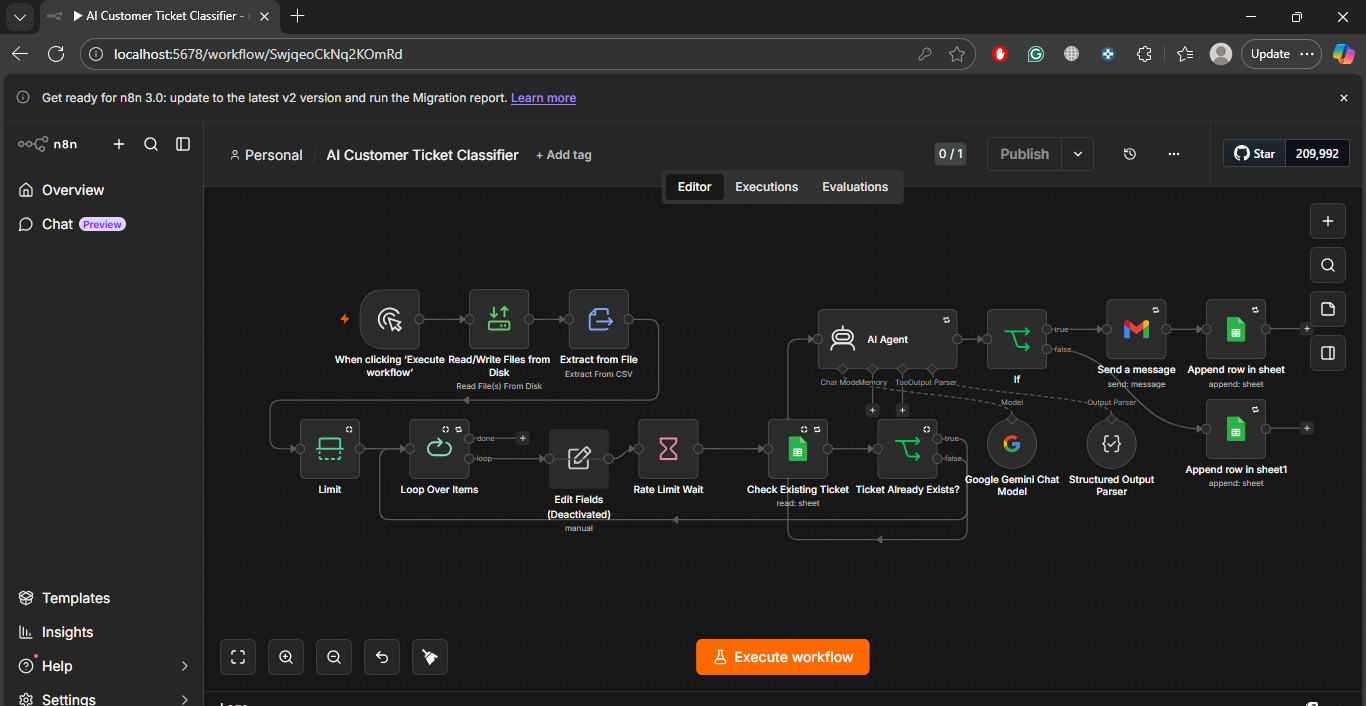
AI Customer Ticket Classifier — my real build, screenshot above
For: support teams · e-commerce stores · clinics · any business sorting tickets by hand
This is not a concept — it is my own working n8n workflow, screenshotted at the top of this page and playable as a demo there. It reads a file of customer tickets, loops through them one by one, checks a Google Sheet so no ticket is ever classified twice, lets a Google Gemini AI Agent assign each ticket a category and priority, then emails it to the right team and appends it to the tracking sheet.
Read File · TriggerTickets CSV read from disk and extracted
→Loop + Rate Limit WaitTickets processed one at a time, safely
→Ticket Already Exists?Google Sheet checked first — duplicates skipped
→AI Agent · Google GeminiCategory + priority via Structured Output Parser
→Gmail + Append RowTicket emailed to the team, logged in the sheet
Google Sheets · Classified Tickets — tracking sheet after a runSample output
| Ticket | Category | Priority | Routed to | Status |
|---|
| “My card was charged twice for order #8412” | Billing | High | Payments team | Emailed + logged |
| “The app crashes when I upload a photo” | Technical | Medium | Support engineers | Emailed + logged |
| “How do I change the email on my account?” | Account | Low | Support desk | Emailed + logged |
| “Invoice shows the wrong VAT amount” | Billing | Medium | Finance team | Emailed + logged |
| “Charged twice!!” (same customer, same order) | Duplicate | — | — | Skipped — already in sheet |
What runs automatically
- Bulk classification of whole ticket files in one run
- Duplicate detection against the tracking sheet before classifying
- Loop + rate-limit wait, so large files never fail halfway
What the business gets
- Every ticket lands with the right team, correctly labelled
- Support staff start from a sorted queue, not a raw inbox
- High-priority tickets are visible the moment the run finishes
n8n Project 6n8n WorkflowReporting
Automated Daily Business Report
For: owners & agencies who check five dashboards and still feel unsure
Every morning at 7 am this workflow pulls yesterday's numbers from payments, ads and the CRM, does the maths nobody enjoys, and delivers one plain-English summary — with anything unusual flagged before the day starts.
Schedule · 7:00 dailyWorkflow wakes up on a timer
→HTTP · Pull dataStripe revenue, Meta / Google ad spend, CRM leads & bookings
→Code · CalculateTotals, conversion rates, cost per lead, day-on-day change
→AI · SummarisePlain-English brief: what happened, what changed, what to watch
→Slack + SheetsBrief delivered, full numbers archived to the dashboard sheet
Slack · #daily-brief — delivered 7:00 AMSample screen
☀️ Yesterday at a glance — Tue 9 Nov
Revenue $4,382 (+12% vs Monday) · Ad spend $612 · Cost per lead $16.10
New leads: 38 · Bookings: 11 · Refunds: 3
⚠️ Watch: refunds are up 2 day-on-day, all from one product (SPF Gel). Details and full table are in the dashboard sheet.Generated automatically by the n8n Daily Report workflow · data: Stripe, Meta Ads, GoHighLevel
What runs automatically
- Data pulled and reconciled across platforms daily
- Anomaly flags: spend spikes, lead drops, refund jumps
- A growing, clean history sheet behind every brief
What the business gets
- One trusted number set instead of five dashboards
- Problems spotted the morning they start
- Weekly and monthly reviews take minutes, not hours