Custom AI solutions are bespoke systems, such as internal AI assistants, knowledge bases, document processing and email triage, built around a specific business workflow. Kaynat Umar consults, designs and builds them with security, accuracy and measurable outcomes in mind.
Sample work
Custom AI, doing real paperwork.
An inbox triage agent you can replay, an AI invoice workflow and a real AI ticket classifier from my own n8n.
Text agent · replay
Inbox Triage Agent
Founder inbox · runs on n8n + GPT/Gemini + Gmail API
Every morning it reads the overnight inbox, sorts each email by urgency and type, drafts replies in your tone from approved answers, and prepares a 30-second digest. Nothing is sent without your click.
InputOvernight inbox: 5 new emails (a client invoice query, a supplier price rise, a partnership pitch, a newsletter, a booking change request).
8 steps · ~12 s
Agent tracethink → tool → observe → act
Press “Run the agent” to replay this run step by step.
Plan
Classify 5 emails → draft replies where a template applies → build digest.
For: agencies · clinics · trades · any business drowning in PDFs and email attachments
Invoices, receipts and intake forms arrive as messy PDFs. This workflow reads them with AI, extracts the fields that matter, checks the maths, files everything — and only bothers a human when something looks wrong.
Gmail / Drive · TriggerNew invoice, receipt or form lands
→
AI · ExtractVendor, dates, line items, totals & VAT pulled out
Review queueExceptions sent to a human with the AI's notes attached
AI extraction · invoice_1187.pdf → structured fieldsSample screen
Document received
📄 invoice_1187.pdfFrom: billing@stadtwerke.example Received via Gmail · 8:02 AM 2 pages · supplier invoice
📄 receipt_hotel_march.pdfFlagged: total does not match line itemsSent to review queue
Fields extracted by AI
Vendor
Stadtwerke Utilities GmbH
Invoice no. / date
INV-1187 · 28 Oct 2026
Net + VAT
€1,079.77 + €205.13 (19%)
Total
€1,284.90
Maths check
✓ Line items re-added — totals match
Filed to
Bookkeeping sheet · Drive /Invoices/2026-10/
Today: 23 documents processed · 21 auto-filed · 2 exceptions waiting for a human
What runs automatically
Field extraction from PDFs, scans and photos of receipts
Arithmetic and duplicate checks before anything is filed
A tidy exception queue instead of a chaotic inbox
What the business gets
Bookkeeping data entered the day documents arrive
Errors caught by maths, not discovered at tax time
Staff review exceptions only — the 90% routine is done
n8n Project 4n8n WorkflowContent & AI
Content Repurposing Autopilot
For: coaches · creators · agencies · businesses sitting on videos, podcasts or blogs
One good piece of content should become ten. This workflow takes a new video or article, transcribes it, drafts platform-ready posts in your voice, waits for your one-tap approval, then schedules everything and logs the results.
RSS / YouTube · TriggerNew video, episode or article published
AI Agent · DraftLinkedIn post, thread, short caption & newsletter section
→
Slack · ApproveYou approve / edit / reject — nothing posts without you
→
Schedule + LogPosts queued per platform, performance logged weekly
Drafts from one video — “5 mistakes killing your onboarding” (24 min)Sample screen
LinkedIn post · drafted“I reviewed 40 onboarding flows last year. The same 5 mistakes showed up in 31 of them. Mistake #1 costs you customers in the first 48 hours…” Waiting for your approval in Slack
X / Twitter thread · 6 posts draftedHook post + 5 mistake posts + closing CTA, formatted and numbered. Waiting for your approval in Slack
Newsletter section · drafted“From this week's video” summary with the 3 key timestamps linked. Scheduled after approval · sends Thursday 9 AM
Nothing publishes without approval · last week: 9 posts published from 1 recording · performance logged to sheet
What runs automatically
Transcription, summarising and multi-format drafting
Per-platform formatting, hashtags and scheduling
Weekly performance roll-up back into one sheet
What the business gets
A week of content from one recording session
Consistent posting without a content hire
Your approval stays in the loop — AI drafts, you decide
Real build · Screenshot from my own n8n
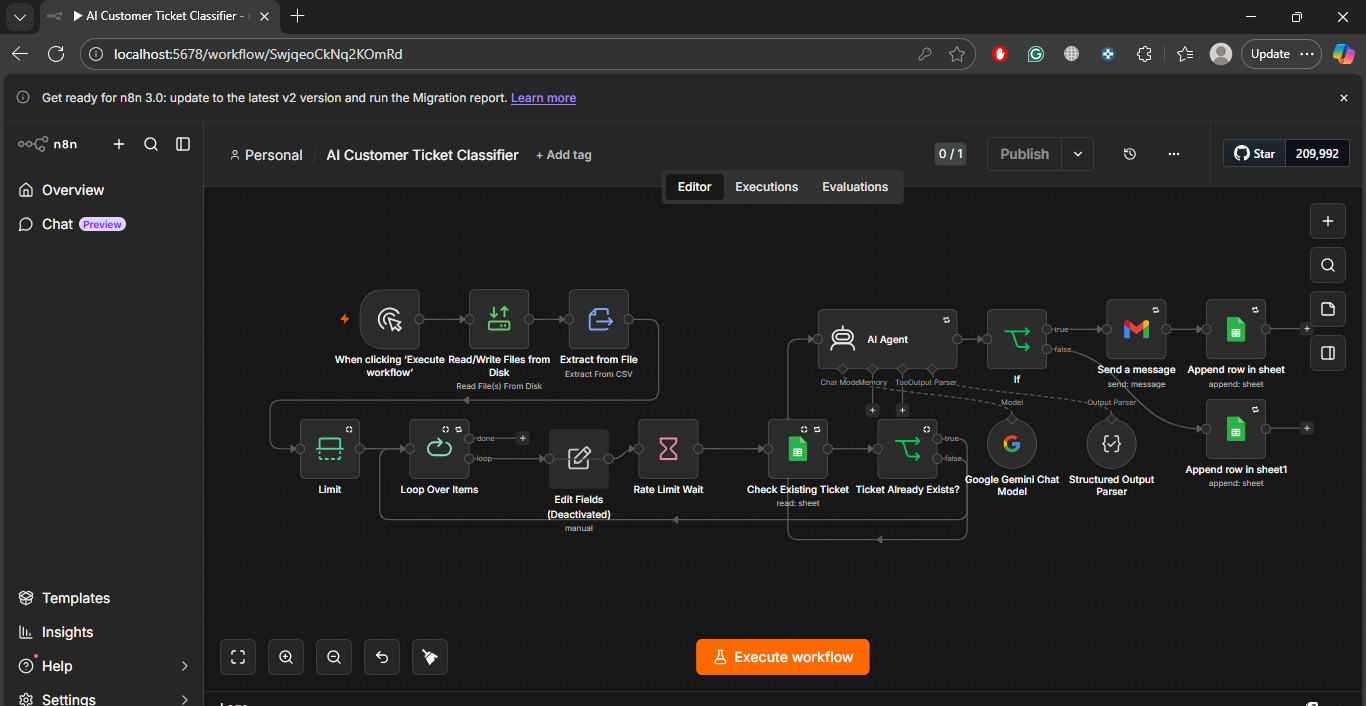
AI Customer Ticket Classifier — a workflow I actually built
Most portfolio automations are drawings. This one is a photograph: my own AI Customer Ticket Classifier, screenshotted in the n8n editor on my machine. A support team drops in a file of customer tickets; the workflow classifies every single one — category, priority, correct team — with no human reading the list first.
n8n editor · Personal / AI Customer Ticket Classifier · localhost:5678/workflow
The actual workflow, exactly as built — click the screenshot to view it full size. Left to right: the file is read and unpacked, tickets are looped one by one with a rate-limit pause, each is checked against the tracking sheet so duplicates are never processed twice, the AI Agent (Google Gemini) classifies it, and the result is emailed out and appended back to Google Sheets.
▶ Watch it instead — 20-second narrated walkthrough. The video zooms through the real screenshot above step by step — CSV in, loop, duplicate check, Gemini AI Agent, Gmail out, sheet logged — with narration in the same voice as the receptionist samples. It is a guided tour of the real build shown in the screenshot, not a mockup animation.
1 · File in, tickets out“Read/Write Files from Disk” + “Extract from File” read the tickets CSV; “Limit” and “Loop Over Items” feed the workflow one ticket at a time.
2 · Duplicates stopped“Check Existing Ticket” reads the Google Sheet and the “Ticket Already Exists?” IF node skips anything already logged — re-running the file is safe.
3 · Gemini does the readingAn AI Agent on the Google Gemini Chat Model, with a Structured Output Parser, returns a clean category and priority for every ticket — no free-text mess.
4 · Sent & loggedGmail sends the classified ticket to the right team, and “Append row in sheet” writes it to the tracking sheet, so the whole run is auditable.
▶ Playable demo — watch it classifyThe same logic as the real workflow, running on 5 sample tickets. Press run and watch each step light up.
Read tickets.csvExtract from File — 5 tickets loaded
→
Loop + rate limitOne ticket at a time, pause between AI calls
→
Check sheetTicket already logged? Skip it
→
Gemini AI AgentCategory + priority, structured output
→
Gmail + SheetsEmailed to the team, row appended
Idle — 5 sample tickets waiting in tickets.csv
Ticket
Category
Priority
Routed to
Status
Results will appear here, one ticket at a time — exactly as rows land in the tracking sheet.
Want this for your support inbox? The same build connects to Gmail, a helpdesk or a form instead of a CSV — ask me on WhatsApp.
Some problems do not fit a template: a legal team that needs contract clauses extracted, a support team that wants answers drawn from thousands of internal pages, an owner who spends two hours a day triaging email. These are best solved by a system designed for that exact work.
The process starts with consulting: finding where AI can be reliable and valuable, and where it cannot. Then a focused build, tested against your real documents and cases, with access controls and logging suitable for business data.
What it is
Bespoke AI built for one workflow
Typical delivery
2 to 6 weeks
Starts with
Opportunity assessment
Data handling
Access control and logging
Outputs
Assistants, search, extraction, drafting
Best for
Professional services, finance, operations
What’s included
Everything it needs to actually work.
AI assistants
Internal tools that help your team draft, search and decide faster.
Knowledge bases
Searchable, source-cited access to your policies, manuals and documents.
Document AI
Extraction, classification and routing of invoices, contracts and forms.
Email AI
Triage, prioritisation and draft replies in your voice, with approval.
Business AI
Reporting, summaries and decision support on top of your own data.
AI consulting
Opportunity assessment, build-versus-buy advice and a practical roadmap.
Process
How we build it
01Assess the opportunity
We find where AI is reliable and worth the effort, and where it is not.
02Prototype on real data
A small working version is tested on your actual documents and cases.
03Build with controls
Access control, logging and review steps are added for business-grade use.
04Roll out and refine
Staged rollout, training and measurement against agreed success criteria.
A custom AI solution is a system built for one specific business workflow, such as document extraction or an internal knowledge assistant, rather than a generic off-the-shelf tool.
Can AI search my company documents?
Yes. A knowledge base indexes your approved documents and answers questions with citations to the source, with permissions that respect who may see what.
How accurate is document AI?
Accuracy depends on document quality and structure. Builds are tested on your real documents, measured, and include human review for low-confidence results.
Do you offer AI consulting only?
Yes. An assessment and roadmap can be delivered on its own if you prefer to build in-house.