AI workflow automation that removes manual work from your business.
Reliable, monitored workflows built in N8N and connected to AI, so data moves, decisions get made and follow-ups happen without anyone babysitting them.
AI workflow automation connects the tools a business already uses and automates repetitive processes, adding AI where judgement is needed, such as classifying, summarising or drafting. Kaynat Umar builds these workflows in N8N with error handling and monitoring so they run reliably.
Sample work
A real n8n build, plus three projects node by node.
The first one is from my own n8n: screenshot, video walkthrough and a playable demo. The others show every node, the data that moves and the result.
Real build · Screenshot from my own n8n
AI Customer Ticket Classifier — a workflow I actually built
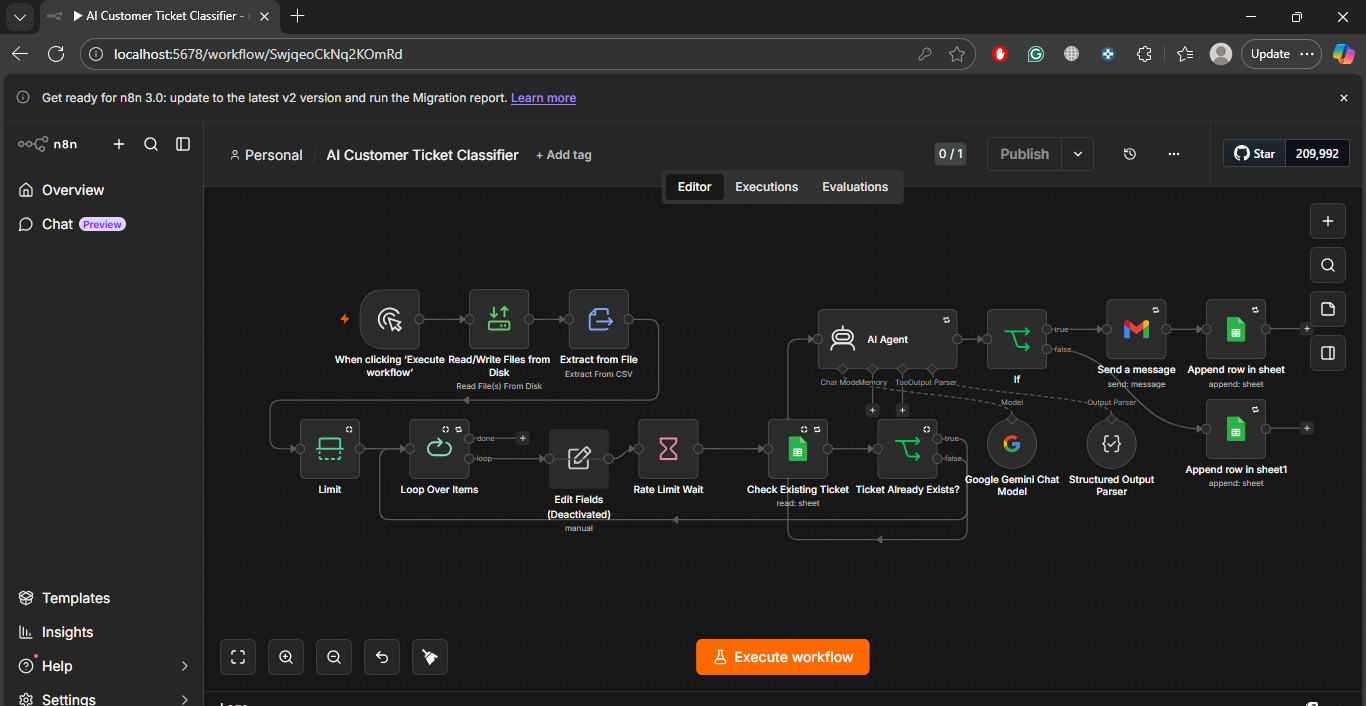
Most portfolio automations are drawings. This one is a photograph: my own AI Customer Ticket Classifier, screenshotted in the n8n editor on my machine. A support team drops in a file of customer tickets; the workflow classifies every single one — category, priority, correct team — with no human reading the list first.
n8n editor · Personal / AI Customer Ticket Classifier · localhost:5678/workflow
The actual workflow, exactly as built — click the screenshot to view it full size. Left to right: the file is read and unpacked, tickets are looped one by one with a rate-limit pause, each is checked against the tracking sheet so duplicates are never processed twice, the AI Agent (Google Gemini) classifies it, and the result is emailed out and appended back to Google Sheets.
▶ Watch it instead — 20-second narrated walkthrough. The video zooms through the real screenshot above step by step — CSV in, loop, duplicate check, Gemini AI Agent, Gmail out, sheet logged — with narration in the same voice as the receptionist samples. It is a guided tour of the real build shown in the screenshot, not a mockup animation.
1 · File in, tickets out“Read/Write Files from Disk” + “Extract from File” read the tickets CSV; “Limit” and “Loop Over Items” feed the workflow one ticket at a time.
2 · Duplicates stopped“Check Existing Ticket” reads the Google Sheet and the “Ticket Already Exists?” IF node skips anything already logged — re-running the file is safe.
3 · Gemini does the readingAn AI Agent on the Google Gemini Chat Model, with a Structured Output Parser, returns a clean category and priority for every ticket — no free-text mess.
4 · Sent & loggedGmail sends the classified ticket to the right team, and “Append row in sheet” writes it to the tracking sheet, so the whole run is auditable.
▶ Playable demo — watch it classifyThe same logic as the real workflow, running on 5 sample tickets. Press run and watch each step light up.
Read tickets.csvExtract from File — 5 tickets loaded
→
Loop + rate limitOne ticket at a time, pause between AI calls
→
Check sheetTicket already logged? Skip it
→
Gemini AI AgentCategory + priority, structured output
→
Gmail + SheetsEmailed to the team, row appended
Idle — 5 sample tickets waiting in tickets.csv
Ticket
Category
Priority
Routed to
Status
Results will appear here, one ticket at a time — exactly as rows land in the tracking sheet.
Want this for your support inbox? The same build connects to Gmail, a helpdesk or a form instead of a CSV — ask me on WhatsApp.
n8n Project 1n8n WorkflowLead Data
AI Lead Enrichment & Smart Routing Engine
For: agencies · real estate · B2B services · anyone buying ads or traffic
Raw form fills are messy — typos, fake numbers, no context. This workflow cleans every lead, enriches it with company and location data, scores it with AI, then routes hot leads to a human in seconds and warm leads into nurture.
Webhook · TriggerForm, ad platform or landing page posts the lead
Orders, stock and spreadsheets drift apart within days. This workflow keeps them in sync in real time and warns the owner before a bestseller runs out — not after a customer hits “sold out”.
Shopify · TriggerNew order / inventory change event
Sheets + Airtable · SyncLive sales & stock ledger updated per order
→
IF · Stock checkBelow threshold? Branch fires the alert path
→
Slack · Alert + draftOwner alerted with a ready-made reorder draft
Google Sheets · Sales & Stock Ledger — synced from ShopifySample screen
SKU
Product
Stock left
Status
VC-SERUM-30
Vitamin C Brightening Serum
14
Low — ~3 days cover · reorder draft sent
SPF-GEL-50
Invisible SPF 50 Gel
212
In stock
NIGHT-RTNL
Retinal 0.1% Night Treatment
58
In stock
#ops-alerts · Slack · 9:41 AM ⚠️ Low stock: Vitamin C Serum — 14 units left at current sales speed (~3 days). Reorder draft for 300 units is ready in the ledger — reply APPROVE to send it to the supplier.Posted automatically by the n8n workflow
Last sync 2 min ago · 38 orders written today · 0 failed syncs
What runs automatically
Every order written to one live ledger — no manual exports
Low-stock alerts with days-of-cover estimate
Failed syncs retried and flagged, never silently lost
What the business gets
Bestsellers reordered before they sell out
One true set of numbers for sales and stock
Hours of spreadsheet upkeep removed every week
n8n Project 6n8n WorkflowReporting
Automated Daily Business Report
For: owners & agencies who check five dashboards and still feel unsure
Every morning at 7 am this workflow pulls yesterday's numbers from payments, ads and the CRM, does the maths nobody enjoys, and delivers one plain-English summary — with anything unusual flagged before the day starts.
Schedule · 7:00 dailyWorkflow wakes up on a timer
→
HTTP · Pull dataStripe revenue, Meta / Google ad spend, CRM leads & bookings
→
Code · CalculateTotals, conversion rates, cost per lead, day-on-day change
→
AI · SummarisePlain-English brief: what happened, what changed, what to watch
→
Slack + SheetsBrief delivered, full numbers archived to the dashboard sheet
☀️ Yesterday at a glance — Tue 9 Nov Revenue $4,382 (+12% vs Monday) · Ad spend $612 · Cost per lead $16.10 New leads: 38 · Bookings: 11 · Refunds: 3 ⚠️ Watch: refunds are up 2 day-on-day, all from one product (SPF Gel). Details and full table are in the dashboard sheet.Generated automatically by the n8n Daily Report workflow · data: Stripe, Meta Ads, GoHighLevel
Runs daily at 7:00 AM · history sheet holds 214 days of reconciled numbers
What runs automatically
Data pulled and reconciled across platforms daily
Anomaly flags: spend spikes, lead drops, refund jumps
A growing, clean history sheet behind every brief
What the business gets
One trusted number set instead of five dashboards
Problems spotted the morning they start
Weekly and monthly reviews take minutes, not hours
Most teams lose hours each week to copy-paste work: moving leads between tools, chasing approvals, formatting reports, sending reminders. Workflow automation turns each of those into a defined, repeatable sequence that runs the moment its trigger fires.
Adding AI lets those workflows handle messy input as well: reading an email and routing it, extracting fields from a document, writing a first-draft reply or scoring a lead. Every workflow includes retries, alerts and a clear owner, so failures are visible rather than silent.
What it is
Automated, monitored business workflows
Primary tool
N8N, with Make or Zapier where suited
Typical delivery
1 to 4 weeks
AI steps
Classify, extract, summarise, draft
Reliability
Retries, alerts, logs
Best for
Ops, sales, finance and support teams
What’s included
Everything it needs to actually work.
Process mapping
A short audit of how work actually flows today, so the right things are automated first.
N8N orchestration
Visual, maintainable workflows connecting hundreds of apps and any API.
AI decision steps
Classification, extraction, summarisation and drafting added only where they add value.
Error handling and retries
Automatic retries, fallbacks and alerts built in from day one.
Monitoring dashboard
See what ran, when, and whether it succeeded.
Documentation and handover
Plain-language documentation so your team understands and can own the system.
Process
How we build it
01Map the process
We trace the current workflow, find the bottlenecks and agree what to automate first.
02Design the flow
Triggers, branches, data fields and failure paths are drawn before building.
03Build and test
Workflows are built in N8N and tested against real and edge-case data.
04Launch and monitor
Deployment with alerts and logs, then tuning as volume and needs grow.
Workflow automation uses software to run repetitive business processes automatically: when a trigger happens, such as a new form submission, a defined series of steps runs across your tools without manual effort.
Why N8N instead of Zapier or Make?
N8N is flexible, can be self-hosted for data control, handles complex branching and custom code well, and scales economically. Zapier or Make are used instead when they suit the project better.
Can AI be added to existing workflows?
Yes. AI steps can classify, extract, summarise or draft inside an existing process, replacing the manual judgement calls that usually block automation.
What if an automation fails?
Workflows include retries, fallbacks and alerts, so failures are visible and recoverable instead of silent.